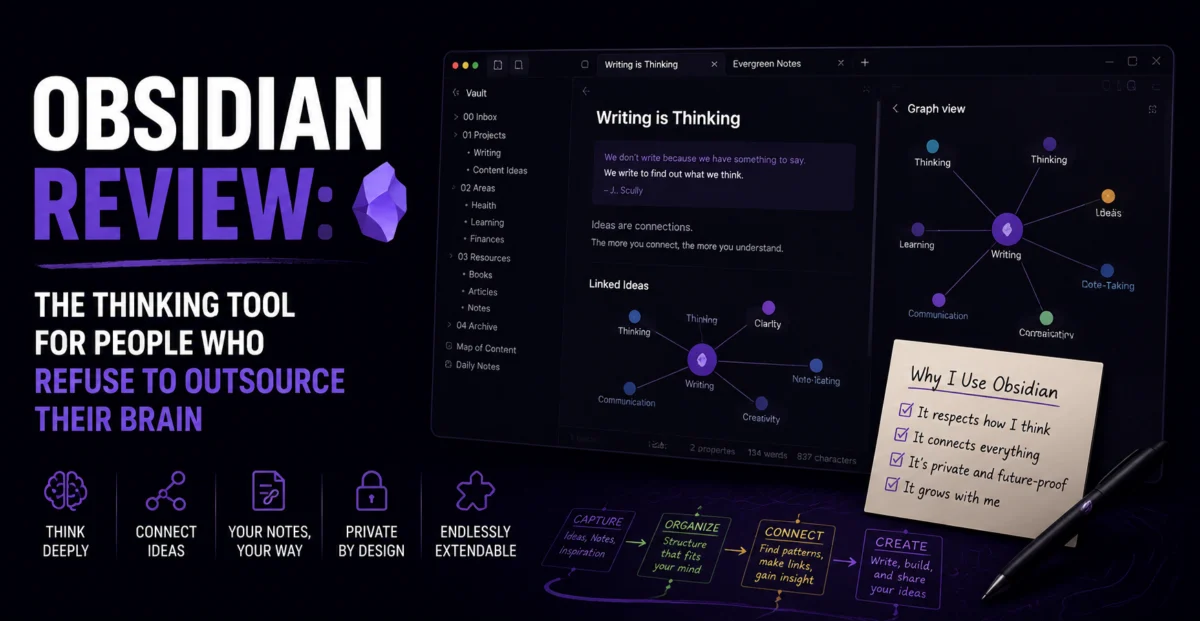
Most productivity software wants to own your data. Obsidian’s entire pitch is the opposite: your notes live as plain Markdown files on your own hard drive, the company behind the app has no ability to see them, and if Obsidian shut down tomorrow, every single note you ever wrote would still open perfectly in a plain text editor. In a category increasingly dominated by cloud-first, AI-saturated, subscription-locked tools, that stubborn independence has turned Obsidian into something close to a cult favorite among writers, researchers, and knowledge workers who think in networks rather than folders.
We used Obsidian as a primary note-taking and research tool for three weeks, building out a genuine “second brain” system for a long-form research project, alongside lighter daily journaling and meeting-notes use. Here’s how a tool built almost entirely around local files and community plugins holds up in an era of AI-native competitors.
Quick Verdict
| Overall Score | 4.5 / 5 — ★★★★★ |
| Best For | Writers, researchers, and anyone who wants full ownership of their notes |
| Starting Price | Free for personal use; sync and publish add-ons from $4/month |
| Standout Feature | Bidirectional linking and a graph view that reveals connections between notes |
| Biggest Drawback | Requires real setup effort — plugins are powerful but not beginner-friendly |
First Impressions: A Blank Folder, and That’s the Point
Opening Obsidian for the first time is a genuinely different experience from opening any other tool on this list. There’s no dashboard, no onboarding wizard pushing a pre-built template, and no cloud account required to get started. You choose a folder on your computer, called a “vault,” and that’s it — you’re looking at an empty text editor with a sidebar. For some people this is disorienting. For the people Obsidian is actually built for, it’s the entire appeal: a blank canvas with zero corporate infrastructure standing between you and your own thoughts.
The core writing experience uses standard Markdown, which means anyone who has ever written a README file or a GitHub issue will feel immediately at home. What makes Obsidian distinct isn’t the editor itself, though — it’s what happens the moment you start linking notes together using double brackets, at which point the tool quietly begins building a web of connections that becomes the actual product.
Design & Usability
Obsidian’s default interface is minimal to the point of austerity — a plain sidebar, a plain editor, and very little visual flourish beyond what you choose to add yourself. This is both a strength and a limitation. Writers who want a distraction-free space to think will appreciate the calm, but anyone expecting the polish of a more commercially designed tool like Notion may initially find it visually underwhelming.
The interface becomes dramatically more capable once you enable the community plugin ecosystem, which numbers in the thousands and covers everything from Kanban boards to spaced-repetition flashcards to full calendar views. This is simultaneously Obsidian’s greatest strength and its steepest learning curve: the “right” version of Obsidian for your workflow doesn’t exist out of the box, and building it requires real time spent browsing, testing, and configuring third-party plugins of wildly varying quality and maintenance status.
Core Features Deep Dive
Bidirectional Linking and Graph View
This is Obsidian’s core differentiator and the reason it’s spawned an entire “second brain” methodology movement online. Linking one note to another using [[double brackets]] creates an automatic backlink on the target note, and over time, a body of notes builds into a genuine network rather than a flat list. The graph view visualizes this network directly, and while it can look more decorative than functional for smaller vaults, it becomes genuinely useful for surfacing forgotten connections once a vault crosses a few hundred notes — during our research project test, the graph view surfaced a link between two sources we’d taken notes on weeks apart and had entirely forgotten were related.
Local-First Storage
Every note lives as a plain .md file on your own device by default. There’s no vendor lock-in, no proprietary format, and no risk of losing access to your notes if a company changes its pricing or shuts down. For anyone who has ever lost access to years of notes trapped inside a discontinued app, this is not a minor feature — it’s close to a philosophical stance, and one that’s increasingly rare in a software landscape moving almost universally toward cloud-only models.
Community Plugins
The plugin ecosystem is genuinely the most extensive of any tool in this review category. We installed a Kanban plugin for lightweight project tracking, a spaced-repetition plugin for studying research material, and a calendar plugin for daily journaling — each one transforming Obsidian into something closer to a purpose-built tool for that specific task. The tradeoff is quality control: plugins are community-maintained, and a small number we tested had compatibility issues after a recent Obsidian update, requiring a workaround before functioning correctly again.
Obsidian Sync and Publish
For users who want multi-device access without relying on a third-party cloud sync tool, Obsidian offers an official, end-to-end encrypted sync service as a paid add-on. A separate Publish add-on allows turning a vault (or part of one) into a public website, which we tested by publishing a small research reference site — the output was clean, fast-loading, and required minimal additional configuration.
Performance & Speed
Because Obsidian is fundamentally a local application working with plain text files, performance is outstanding even on vaults with several thousand notes. Search, in particular, is close to instantaneous, a meaningful advantage over cloud-based competitors where large workspaces can introduce noticeable lag. The only performance friction we encountered came from certain heavier community plugins, not from the core application itself.
Pricing Breakdown
| Plan | Price | Best For |
|---|---|---|
| Personal Use | $0 | Individuals — the core app is free indefinitely |
| Sync | $4/month | Users wanting official encrypted multi-device sync |
| Publish | $8/site/month | Anyone wanting to turn a vault into a public website |
| Commercial License | $50/user/year | Businesses using Obsidian for work purposes |
Who Should Use Obsidian (and Who Shouldn’t)
Obsidian is an outstanding choice for writers, researchers, students, and anyone building a long-term personal knowledge base who values data ownership and is willing to invest time into configuration. It is a poor fit for teams needing real-time collaboration, or for anyone who wants a tool that works well immediately with zero setup — the plugin-driven customization that makes Obsidian so powerful is also what makes it a genuinely bad fit for anyone unwilling to spend time tinkering.
“Obsidian doesn’t try to think for you. It tries to get out of the way while you think, and then quietly remembers everything you were thinking about.” — Depplo Team testing notes
Pros and Cons
| Pros | Cons |
|---|---|
| Full local ownership of notes as plain Markdown files | Minimal default interface may underwhelm new users |
| Bidirectional linking and graph view surface real connections | Requires real setup effort via community plugins |
| Outstanding performance even on very large vaults | Weak native support for real-time team collaboration |
| Free for personal use, with reasonable paid add-ons | Plugin quality and maintenance varies significantly |
Integrations and Ecosystem
Because Obsidian is built around the plugin system rather than a fixed feature set, its “integrations” look different from any other tool in this review — instead of a handful of officially sanctioned connections to Slack or Google Drive, there are community plugins that sync with Readwise for highlight imports, pull in calendar events from Google Calendar, and even connect to spaced-repetition study systems for turning research notes into flashcards automatically. During testing, the Readwise integration proved genuinely valuable for the research project, automatically pulling book and article highlights directly into linked daily notes without any manual copy-pasting.
The tradeoff, as with all of Obsidian’s plugin-based functionality, is that quality and long-term maintenance vary significantly from plugin to plugin. A small number of the more niche integrations we tested showed signs of infrequent updates, and one calendar-sync plugin required a manual configuration fix after a recent core app update changed an underlying API. For users comfortable troubleshooting the occasional broken plugin, this is a minor inconvenience. For anyone wanting guaranteed, officially supported integrations, it’s worth weighing carefully before committing significant workflows to third-party plugins.
How It Compares to the Alternatives
Against Notion, Obsidian trades collaborative, cloud-native convenience for local ownership and raw note-linking power — Notion remains the better choice for teams, while Obsidian remains the better choice for individual deep-thinking work. Against dedicated note apps like Evernote or Apple Notes, Obsidian offers dramatically more structural power through linking and graph visualization, at the cost of a considerably steeper learning curve and far less polish for users who just want to jot something down quickly. The clearest way to frame the choice: Obsidian is for people building a long-term body of interconnected knowledge, not for people who need a fast scratchpad or a collaborative team workspace.
Final Verdict
Obsidian rewards exactly the kind of person who reads a 1,500-word software review before making a decision: someone who wants to understand a tool deeply before committing to it, rather than being sold a polished demo. It won’t appeal to everyone, and it isn’t trying to. For the audience it’s built for, it remains one of the most quietly powerful pieces of productivity software available, precisely because it refuses to be anything other than a very well-built blank page.
Rating: ★★★★★ 4.5/5
About the Author