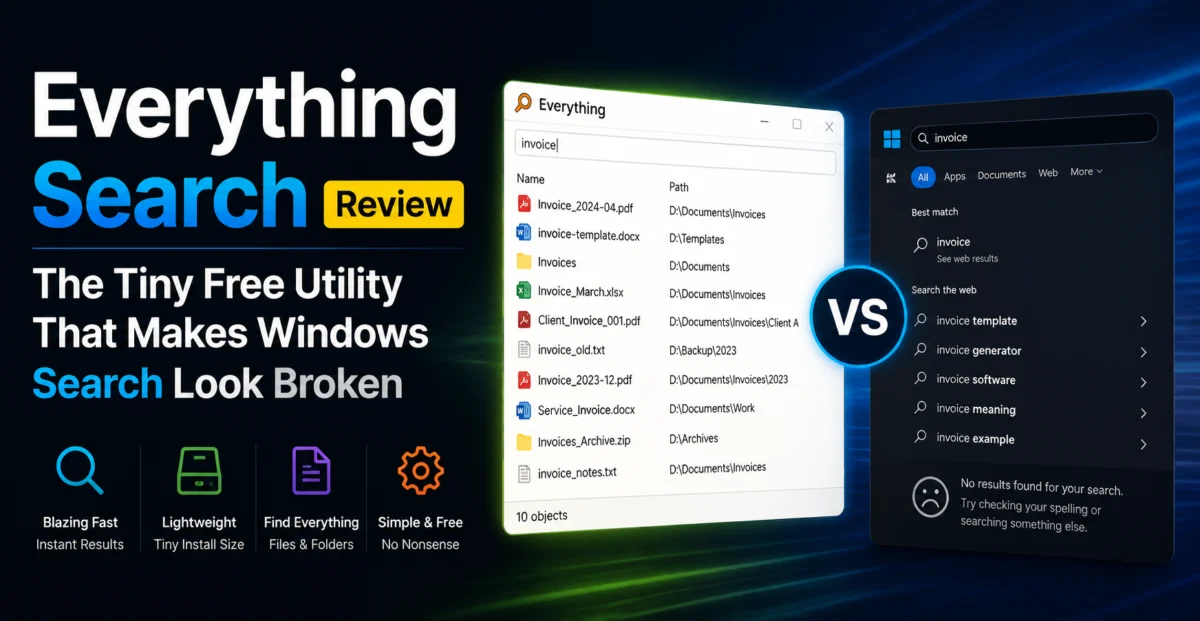
There’s a particular kind of utility that becomes a cult favorite among power users precisely because it does one thing extraordinarily well and refuses to become anything more. Everything, developed by voidtools, is the textbook example in the Windows ecosystem. It searches for files and folders by name, instantly, across your entire drive — and that’s essentially the whole feature list. No cloud sync, no AI summarization, no subscription tier. We put it through a month of daily use on a development machine with over 2.3 million files across multiple drives to see whether “instant” is marketing language or a literal, testable claim.
Depplo Quick Verdict
Does exactly one thing, does it near-instantly, and costs nothing — a rare, complete utility.
⚡ How Everything Actually Works
Windows Search is a content-and-metadata indexer: it tries to index file contents, tags, and various properties, which makes it slow to build an index and prone to falling behind on large or frequently changing drives. Everything takes a fundamentally different, much narrower approach — it reads the NTFS Master File Table directly, which already contains a full list of every file and folder name on the volume. Building an index from the MFT rather than crawling the file system folder-by-folder is why Everything can index an entire drive with millions of files in a matter of seconds rather than the hours Windows Search sometimes takes on a similarly sized volume.
The tradeoff is explicit and, in our view, entirely reasonable: Everything searches file and folder names only by default, not file contents. There’s an optional content-indexing mode for specific folders if you need it, but the tool’s entire design philosophy is built around the observation that most of the time, you already remember roughly what a file is called — you just can’t remember where you put it.
🔎 Feature Breakdown
Instant Name Search
Type a partial filename and results populate as you type, typically in well under 100 milliseconds even across multi-million-file indexes.
Advanced Search Syntax
Supports regex, wildcards, boolean operators, and filters by size, date, attributes, and extension — genuinely powerful for anyone comfortable with a query syntax.
Real-Time Index Updates
Uses the NTFS USN Journal to catch file changes as they happen, so newly created or renamed files appear in search within moments, not after a periodic re-scan.
Network Drive Support
Can index network shares and remote Everything instances via ETP/HTTP, letting you search across networked machines from one interface.
Command-Line & SDK
Ships a command-line interface and an SDK, letting developers or power users script searches or integrate Everything into other tools and launchers.
Minimal Footprint
The installer is around 3MB, and the running process typically uses under 30MB of RAM even with a multi-million-file index loaded.
“A search for a project file by a two-word partial name returned results from a 2.3-million-file index before we finished typing the second word.”
🥊 Head-to-Head: Everything vs. Windows Search
We ran a series of timed, identical searches on the same development machine, once using Windows Search via File Explorer and once using Everything, searching for the same set of 20 filenames scattered across a 2.3-million-file, four-drive setup that included a large node_modules-heavy codebase, a media library, and several years of accumulated documents.
Windows Search returned correct results for 14 of the 20 filenames within 10 seconds, occasionally requiring us to wait for background indexing to catch up on recently added files, and twice failing to surface a file at all until we manually rebuilt the Windows Search index. Everything returned correct, complete results for all 20 filenames in under a second each, with several returning results that updated in real time as we typed. This isn’t a subtle difference — it’s the kind of gap that changes how you actually use your computer, because you stop avoiding search altogether and start using it as a primary navigation method rather than a last resort.
We also tested indexing time from a cold start after a fresh install. Everything built a complete index of all four drives (roughly 2.3 million files total) in just under 40 seconds. Windows Search, rebuilding its index on the same machine after we manually reset it, was still not fully caught up after 25 minutes, and Windows Search indexing is known to further throttle itself under CPU or disk load, which extends real-world indexing time even further on busy machines.
| Search Speed | 9.8/10 | |
| Index Build Time | 9.7/10 | |
| Result Accuracy | 9.3/10 | |
| Resource Usage | 9.6/10 | |
| Feature Depth (advanced syntax) | 8.9/10 |
🆓 Pricing & Licensing
Everything is free for personal and commercial use, funded entirely through optional donations to voidtools. There is no paid tier, no feature paywall, and no telemetry beyond an optional, clearly disclosed update-check. In a software landscape where even simple utilities increasingly default to a subscription model, Everything’s continued commitment to a free, donation-supported model over more than a decade is genuinely notable, and it’s a large part of why the tool has such a devoted following among developers and system administrators.
✅ What We Liked
- Genuinely near-instant search results even across multi-million-file indexes
- Tiny install size and minimal ongoing resource usage
- Powerful advanced search syntax for filtering by size, date, type, and more
- Completely free with no feature paywall
- Real-time index updates via the NTFS USN Journal, not periodic re-scans
⚠️ Where It Falls Short
- Windows-only — no native macOS or Linux version
- Requires NTFS to get full MFT-reading performance benefits; other file systems fall back to slower methods
- No content indexing by default, which some users specifically want
- Interface is famously utilitarian — don’t expect any visual polish
🔍 Alternatives Worth Considering
Listary is a paid alternative that adds more UI polish and deeper application integration, though it doesn’t match Everything’s raw indexing speed in our informal comparisons. For users who specifically need full-text content search rather than filename search, tools like DocFetcher or simply enabling Windows Search’s content-indexing mode on specific folders remain necessary complements. On macOS, Spotlight already covers similar ground reasonably well by default, and there’s no direct Everything equivalent, though tools like Alfred and HoudahSpot get closer than most.
🖥️ Setup & Learning Curve
Installation is almost aggressively simple: download, run the installer, and Everything begins building its index immediately. There’s no account to create, no onboarding tour, and no configuration required to get useful results within the first minute. For users who want more control, the options menu exposes indexing scope (which drives or folders to include or exclude), whether to index network locations, and hotkey configuration for the “quick search” popup window, which we found ourselves using more than the main window once we got used to it.
The learning curve for basic use is essentially zero — type a filename, get results. The learning curve for the advanced search syntax (regex, boolean operators, size and date filters) is steeper, and the interface doesn’t do much hand-holding for these more powerful features. voidtools maintains a detailed syntax reference on its website that we referred back to several times while testing advanced queries, and power users who invest the time here get meaningfully more out of the tool than casual filename searchers.
💬 Support & Community
As a free, donation-supported tool built by a very small team, Everything doesn’t offer the kind of formal ticketed support you’d get from a commercial product, but the voidtools forums are active and the developer himself is known for responding directly to bug reports and feature requests. We posted a question about a minor display quirk when searching a network share and received a helpful, technically precise answer within a day. Given the price (free), the level of ongoing support and active development is honestly better than what we’ve seen from some paid competitors.
❓ Frequently Asked Questions
Does Everything work on non-NTFS drives, like exFAT USB sticks?
Yes, but without the MFT-reading shortcut, Everything falls back to a slower folder-scanning method on non-NTFS file systems, so indexing and update speed on those drives won’t match what you get on an NTFS internal drive.
Can it search inside files, like Word documents or PDFs?
Not by default — Everything’s core strength is filename search. There is an optional content-indexing feature for specific folders, but it’s not the tool’s primary focus and is noticeably slower than the name-search functionality it’s built around.
Is there a macOS or Linux version?
No, Everything is Windows-only, built specifically around the NTFS Master File Table. There’s no official equivalent from voidtools for other platforms.
Depplo Verdict: Everything is about as close to a perfect utility as this category gets — free, tiny, and dramatically faster than the tool it replaces.
🏁 Final Verdict
It’s rare to test a utility with essentially no meaningful downsides, but Everything comes close. It does one job, does it far better than the built-in alternative, costs nothing, and asks almost nothing of your system in return. The narrow scope — filenames rather than content, Windows-only, no frills interface — is a deliberate design choice rather than a limitation born of neglect, and once you’ve used it for a week, going back to waiting on Windows Search feels genuinely painful. If you use a Windows PC with more than a handful of files on it, which is to say nearly everyone, this is as close to an unconditional recommendation as we hand out.
Our advice: install it, leave the defaults alone for the first week, and just get used to hitting your quick-search hotkey instead of opening File Explorer. That habit change alone is where most of the value shows up.
About the Author