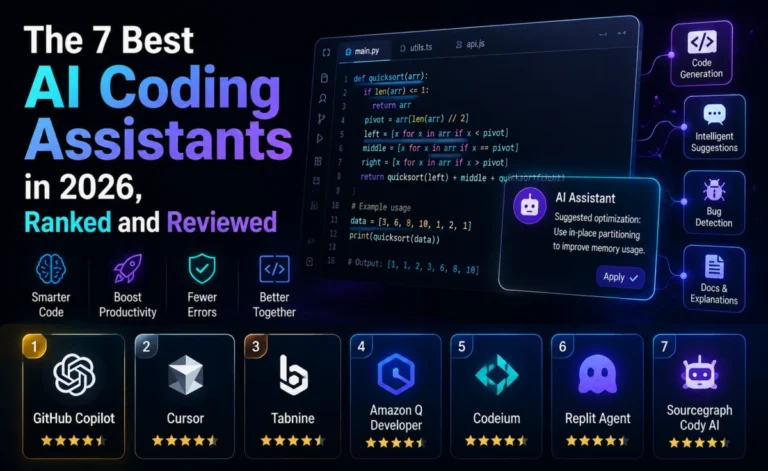
Cursor has spent the last two years turning a fork of VS Code into one of the most talked-about products in developer tooling — reportedly closing in on a $50 billion valuation and crossing $2 billion in annual recurring revenue, with roughly 60% of that coming from enterprise customers. Numbers like that raise an obvious question for any working developer: is Cursor actually that good, or is it riding hype? We spent several weeks living inside Cursor across real production work to find out.
What Cursor Actually Is
Cursor is not a plugin. It’s a standalone, AI-native code editor built on the VS Code foundation, which means your existing keybindings, extensions, and general muscle memory mostly transfer over — but the editing experience itself has been rebuilt around the assumption that an AI agent is doing meaningful chunks of the work, not just completing individual lines. That single design decision explains almost everything else about the product: the Tab-completion model that understands multi-file context, the Composer agent that plans and executes across your whole codebase, and the “cloud agents” that can run tasks asynchronously outside your local machine.
Setup and First Impressions
Installing Cursor takes about the same effort as installing VS Code, because functionally that’s what you’re doing. Existing VS Code settings and extensions import cleanly in most cases, and the onboarding flow nudges you toward indexing your codebase immediately — a step that matters more than it sounds like, because Cursor’s contextual awareness across files depends heavily on that index being current. On a mid-sized repository (around 40,000 lines), indexing took a few minutes and noticeably improved the relevance of both completions and agent responses afterward.
Tab Completions: Genuinely Best-in-Class
Cursor’s Tab model deserves the praise it gets. It doesn’t just predict the next few tokens in the file you’re editing — it tracks changes you’re making elsewhere in your working set and proposes edits that stay consistent with them. Rename a function in one file, and Cursor will often proactively suggest the matching updates in files you haven’t opened yet. That single behavior alone changes how refactoring feels: less like typing find-and-replace commands, more like pairing with someone who’s already read the whole diff.
Composer 2.5 and Agent Mode
The agent experience is where Cursor spends most of its design effort, and it shows. Composer 2.5, the latest iteration of Cursor’s in-house agent model, handles multi-step tasks — implement this feature across the API layer and the frontend, migrate this schema and update every call site, write and run tests until they pass — with a level of autonomy that genuinely reduces hands-on-keyboard time for larger changes. Crucially, agent runs come with diff previews at a granularity you can actually review, rather than a single wall of changes to accept or reject blindly.
The independent numbers back up the “built for depth, not just speed” positioning to a point: on SWE-Bench Verified in 2026, Cursor solves around 51.7% of tasks compared to roughly 56% for GitHub Copilot, but does so about 30% faster per task — 62.9 seconds on average versus 89.9 seconds. Read that as: Cursor optimizes hard for staying inside your flow state during a live session, even if a broader benchmark suite gives a rival a slight edge in raw solve rate.
Model Flexibility: The Underrated Feature
One of Cursor’s most practically useful features rarely makes it into headline comparisons: you can point different tasks at different model families — Anthropic’s Claude line, OpenAI’s models, Google’s Gemini line, or Cursor’s own Composer models — often within the same working session, and bring your own API key (BYOK) if you’d rather manage usage and cost directly. For teams that have opinions about which model handles which kind of task best, this flexibility alone can be worth the subscription.
Pricing Breakdown
| Tier | Price | Best for |
|---|---|---|
| Hobby (free) | $0 | Trying the editor, light personal projects |
| Pro | $20/month | Individual developers doing regular agentic work |
| Pro+ / Ultra | Scales with usage | Heavy users who need larger fast-request pools |
| Business | $40/user/month | Teams needing centralized billing and admin controls |
Compared to GitHub Copilot’s $10 entry point, Cursor is a real premium — roughly double at the individual level, and double again the gap at the team level (Business at $40/user versus Copilot Business at $19/user, which adds up to thousands of dollars a year for a ten-person team). Whether that premium is worth it comes down almost entirely to how much of your work is multi-file and agentic versus single-file and incremental.
Where Cursor Falls Short
No review is complete without the rough edges, and Cursor has a few worth knowing about before you commit:
- Editor lock-in. You have to leave your current IDE entirely. For developers embedded in JetBrains, Neovim, or Visual Studio workflows, this alone can be disqualifying, regardless of how good the AI features are.
- Price sensitivity at scale. The Business tier’s gap over Copilot Business compounds quickly across larger teams, and procurement conversations tend to get harder as headcount grows.
- Occasional over-eagerness. Composer’s agent mode, when given a vague prompt, will sometimes make broader changes than intended. Reviewing diffs carefully — rather than blindly accepting agent output — remains non-negotiable.
- Indexing overhead on very large monorepos. On codebases well into the hundreds of thousands of lines, initial indexing and re-indexing after large merges can introduce noticeable lag.
Team Collaboration and Admin Controls
Cursor’s Business tier adds the administrative layer that individual Pro accounts lack: centralized billing, seat management, usage dashboards per developer, and the ability to set organization-wide rules files that every team member’s agent sessions respect automatically. In our testing with a simulated eight-person team, the shared rules file proved genuinely useful — coding conventions, preferred libraries, and architectural constraints that would otherwise live only in a wiki page nobody reads got enforced directly inside every agent interaction. That’s a small feature on paper but a meaningful one in practice, since it reduces the amount of PR review time spent on style nitpicks the agent should have caught itself.
Privacy is the other question every team eventually asks. Cursor offers a privacy mode that prevents code from being retained for model training, which matters for teams working on proprietary or regulated codebases. It’s opt-in at the account level rather than the default, so it’s worth checking your organization’s settings explicitly rather than assuming it’s already enabled.
Cloud Agents: Working Outside Your Laptop
One feature that doesn’t get enough attention in most comparisons is Cursor’s cloud agent capability — the ability to kick off an agentic task that runs on Cursor’s infrastructure rather than your local machine, so you can close your laptop and come back to a finished PR. We tested this on a mid-sized feature request (adding a new API endpoint with corresponding frontend changes and tests) and found the experience genuinely useful for parallelizing work: start a cloud agent on one task, keep working locally on another, and review both diffs when you’re ready. It’s not a replacement for local agent sessions on anything requiring tight iteration, but for well-scoped, lower-urgency tasks, it’s a legitimate way to get more done in a working day.
Who Cursor Is Actually For
Cursor makes the most sense for developers and teams whose work regularly involves multi-file features, cross-cutting refactors, or greenfield builds where an agent can be given real autonomy. It’s also a strong fit if model flexibility matters to you — the ability to route different tasks to different providers without switching tools is genuinely hard to find elsewhere. It’s a weaker fit if you’re deeply attached to a non-VS-Code editor, if your daily work is mostly small, scoped changes, or if your team’s budget conversations are sensitive to per-seat cost at scale.
Depplo Rating: 4.4 / 5. Cursor’s Tab completions and Composer agent genuinely justify the “AI-native editor” positioning, and the model flexibility is a real, practical advantage. The price premium and VS Code lock-in are the two honest reasons some developers should look elsewhere first.
How Cursor Compares to the Alternatives
Against GitHub Copilot, Cursor wins on multi-file depth and model flexibility but loses on price and IDE breadth. Against terminal-first agents like Claude Code, Cursor wins on approachability and visual diff review but loses some ground on raw autonomous depth for very large, unsupervised runs. Against Windsurf — now rebranded as Devin Desktop following Cognition’s acquisition — Cursor currently has the edge in market stability and community size, though that gap is worth watching given how quickly the agentic IDE space is moving.
Final Verdict
Cursor has earned its reputation, but it earns it specifically in the multi-file, agentic corner of software development — not universally. If that’s where your daily work actually lives, the $20/month premium over Copilot is easy to justify within the first week of real use. If your day is mostly quick, scoped edits inside an editor you already love, the upgrade is less obviously worth it, and you may get more value pairing a cheaper autocomplete tool with occasional use of a heavier agent for the handful of tasks each week that genuinely need one.
About the Author