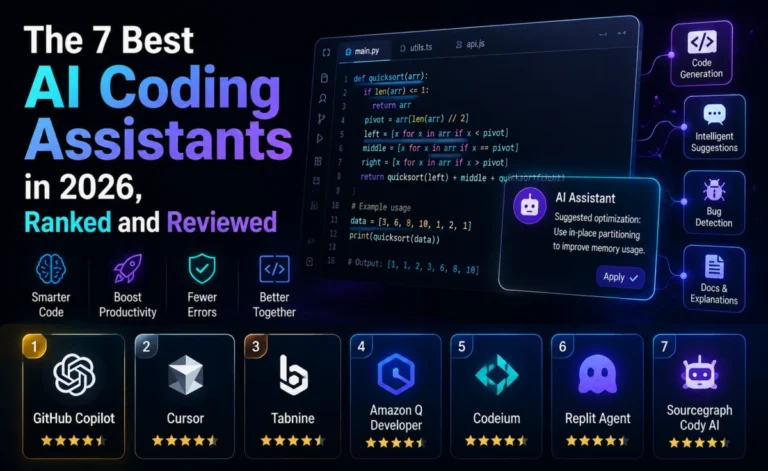
Every other tool in this category gives you a chat panel, an inline suggestion, or a sidebar. Claude Code gives you none of that — it hands you a prompt in your terminal and lets an autonomous agent read your files, write code, run commands, execute tests, and iterate on failures until the task is done. No editor UI, no inline autocomplete, nothing to click. After weeks of running real production work through it, here’s our honest assessment of Anthropic’s terminal-native coding agent.
What Claude Code Actually Is
Claude Code is a command-line application, not an IDE and not an extension. You install it with a single command, run claude from inside a project directory, and describe what you want done in plain language. From there, it operates in an agentic loop: reading relevant files, editing them, running the project’s test suite or build commands, reading the output, and correcting course — all without an editor window open. It is, deliberately, “an agent without an IDE.”
This is a meaningfully different category from Cursor or Windsurf, which are agents wrapped inside a full editor. Claude Code assumes you’re comfortable working from the terminal and that you want the agent operating with real autonomy across an entire session rather than presenting incremental, editor-style diffs for line-by-line approval.
Setup: Fast, But the Real Setup Is CLAUDE.md
Installing the CLI itself takes under a minute. The part that actually determines whether Claude Code performs well on your codebase is writing a proper CLAUDE.md file — a project-root document describing your architecture, tech stack, conventions, and any constraints the agent should respect. In our testing, a thorough first pass at this file took roughly 15 to 30 minutes per project. That investment paid for itself almost immediately: the difference between a vague CLAUDE.md and a detailed one showed up clearly in how often the agent needed correction during long autonomous runs.
Where Claude Code Genuinely Excels
The agentic loop is the whole product, and it’s a strong one. Claude Code’s 200K-token context window lets it reason across an entire codebase rather than just the file currently “open” — a concept that doesn’t really apply here since there’s no editor. In our testing, this showed up most clearly on large, structurally complex tasks: refactoring a 15,000-line Rails application, tracing a bug through several layers of an unfamiliar service, or executing a schema migration and updating every downstream call site in one autonomous pass.
It’s also worth being direct about what makes this tool different from IDE-based agents: the depth of unsupervised operation. Claude Code will run shell commands, execute your test suite, read the failures, and try again — repeatedly, without you approving each individual step — in a way that IDE-embedded agents (which tend to pause for diff approval at each stage) generally don’t. That’s a feature for developers who trust the process and want to walk away from the keyboard; it’s a liability for developers who want to review every change as it happens.
Where Claude Code Struggles
The honest caveats matter as much as the praise here:
- No inline autocomplete, at all. This isn’t a missing feature waiting on a roadmap — it’s a deliberate design choice. If you want Tab-to-accept completions while typing, Claude Code simply doesn’t offer that experience, full stop. You’ll want a separate tool (or a Claude-powered extension) alongside it for that.
- Vague prompts produce mediocre results. Like any agentic tool, Claude Code performs best with clear, well-scoped instructions. Hand it an ambiguous request and you’ll get an ambiguous — sometimes overreaching — result.
- Anthropic-only by design. Unlike Cursor or Windsurf, there’s no routing to OpenAI or Google models. That’s a strength if you’re standardizing on Claude and trust it fully; it’s a real limitation if you want provider flexibility for different task types.
- Cost can climb fast on heavy usage. Because pricing is usage-based against your Anthropic account (or bundled into a Claude subscription tier), a full day of intensive agentic sessions can cost noticeably more than a flat-rate IDE subscription — though you’re also getting more raw agentic horsepower per run in exchange.
Pricing: What It Actually Costs in Practice
| Usage pattern | Typical monthly cost |
|---|---|
| Light use (~1 hour/day) | $5 – $15 |
| Moderate use (~3–4 hours/day) | $30 – $80 |
| Heavy, full-time agentic work | $100 – $300 |
| Bundled Pro-tier access | Around $20/month, aligned with the rest of the market |
| Max plan for power users | Up to $200/month for the highest usage tier |
The CLI itself is free to install — you only pay for what you actually use, either via the Anthropic API directly or through a bundled Claude subscription. This is a genuinely different pricing shape than the flat-rate model most competitors use, and it rewards developers who are disciplined about scoping tasks rather than letting the agent churn on open-ended requests.
Real-World Test: The 15,000-Line Refactor
The clearest signal from our testing came from a large, structurally messy Rails application in need of a significant refactor. Given a well-written CLAUDE.md and a clearly scoped instruction set, Claude Code worked through the task in a single largely unsupervised session — reading the existing structure, making changes across many files, running the test suite after each meaningful change, and self-correcting when tests failed. The end result required review, as any AI-generated change should, but the amount of manual intervention needed during the process itself was strikingly low compared to editor-based agent tools working on the same scale of task.
Extending Claude Code: Skills, Subagents, and Hooks
Beyond the base agentic loop, Claude Code has grown a small ecosystem of primitives worth understanding before you write it off as “just a CLI.” Skills let you package reusable, domain-specific instructions — a house style for writing database migrations, for example — that the agent can load on demand instead of you re-explaining the same conventions in every session. Subagents let you delegate a well-defined piece of a larger task to a separate agent instance with its own narrower context, which keeps the main session’s reasoning focused rather than cluttered. Hooks let you run custom scripts at specific points in the agentic loop — after a file edit, before a commit — giving teams a way to bolt on their own validation or formatting steps automatically.
None of these are strictly necessary to get value from Claude Code on day one, but teams that invest time in them tend to report meaningfully fewer corrections needed during long autonomous runs, similar to the payoff we saw from writing a thorough CLAUDE.md in the first place. Think of the base tool as strong out of the box, and these primitives as the way you compound that strength across a whole team rather than a single developer’s local setup.
A Note on Trust and Review Discipline
The deeper autonomy that makes Claude Code powerful is also the thing that demands the most discipline from the developer using it. Because the agent can run for long stretches without pausing for approval, it’s tempting to treat a green test suite as proof the change is correct and merge without a close read. We’d push back on that instinct hard. Tests passing tells you the code does what the tests check for — it doesn’t tell you the change is architecturally sound, doesn’t introduce subtle security issues, or matches the intent behind the original request. Every team we spoke with that had a bad experience with Claude Code traced it back to skipping review on a large autonomous run, not to a flaw in the tool itself.
How It Compares
Against Windsurf (now rebranded Devin Desktop after Cognition’s acquisition of Codeium), the split is architectural: Windsurf/Devin Desktop gives you an agent inside a full IDE with supervised, diff-by-diff execution; Claude Code gives you a deeper, more autonomous loop with no IDE at all. Against Cursor, the same basic trade-off applies, though Cursor splits the difference by offering both a polished visual editor and increasingly capable agent runs. Against GitHub Copilot, there’s barely an overlap — Copilot is fundamentally an IDE-completion tool with growing agentic features, while Claude Code is an agent-first tool with no completion features whatsoever.
Depplo Rating: 4.5 / 5. Claude Code is the most autonomous, most “hands-off” of the major coding agents we tested, and on large, well-scoped tasks that autonomy translates directly into saved time. The lack of any inline completion experience and the usage-based pricing model are real trade-offs, not just adjustment periods — go in with clear expectations on both.
Who Should Use Claude Code
This tool is the strongest fit for developers who are comfortable working from the terminal, who want to hand off large or structurally complex tasks and walk away rather than supervise each step, and who are already comfortable standardizing on Claude as their model of choice. It’s a weaker fit for developers who want inline autocomplete as their primary AI touchpoint, who need multi-provider model flexibility, or who prefer approving every change incrementally inside a visual diff view.
Final Verdict
Claude Code isn’t trying to be everyone’s daily driver — it’s trying to be the most capable autonomous agent available for the moments when a task is big enough to genuinely delegate. Judged on that specific goal, it succeeds convincingly. Most serious engineering teams we’ve spoken with in 2026 aren’t using it as their only tool; they’re pairing it with something that handles inline completions, and reaching for Claude Code specifically when a task is large enough to warrant real autonomy. Used that way, it’s one of the most genuinely productivity-changing tools in this entire category.
About the Author